

.shipfox/workflows/ — triggers, jobs, steps, runners — a shape you already know how to read. The difference is what a step can be: a step runs a shell command or runs an AI agent — a model, a prompt, and your repository checked out. Agents and commands share one lifecycle, so a gate can retry an agent until your tests pass, and every agent step records a full session: messages, thinking, tool calls, token usage, and cost.
How it works
Define a workflow
Write a YAML file under
.shipfox/workflows/ in your repository. Commit and push — Shipfox picks it up automatically without any manual import step.Configure a trigger
Choose when the workflow runs: on a GitHub push, a Sentry issue, a webhook from any system, or on demand from the dashboard — with more integrations on the way. Each trigger is a named entry under the
triggers key in your workflow YAML.Jobs run on your runners
Each job executes on a runner you register with Shipfox. Jobs are fully isolated — each one re-clones the repository before executing, so no state bleeds between runs.
Steps: commands or agents
Each job contains one or more steps. A step runs a shell command (
run) or an AI agent — specify a model and a prompt and it reads your repo, runs tools, and acts. Agent steps are first-class: same lifecycle as shell steps, so they stream output, report status, and can be gated and retried until the result is correct.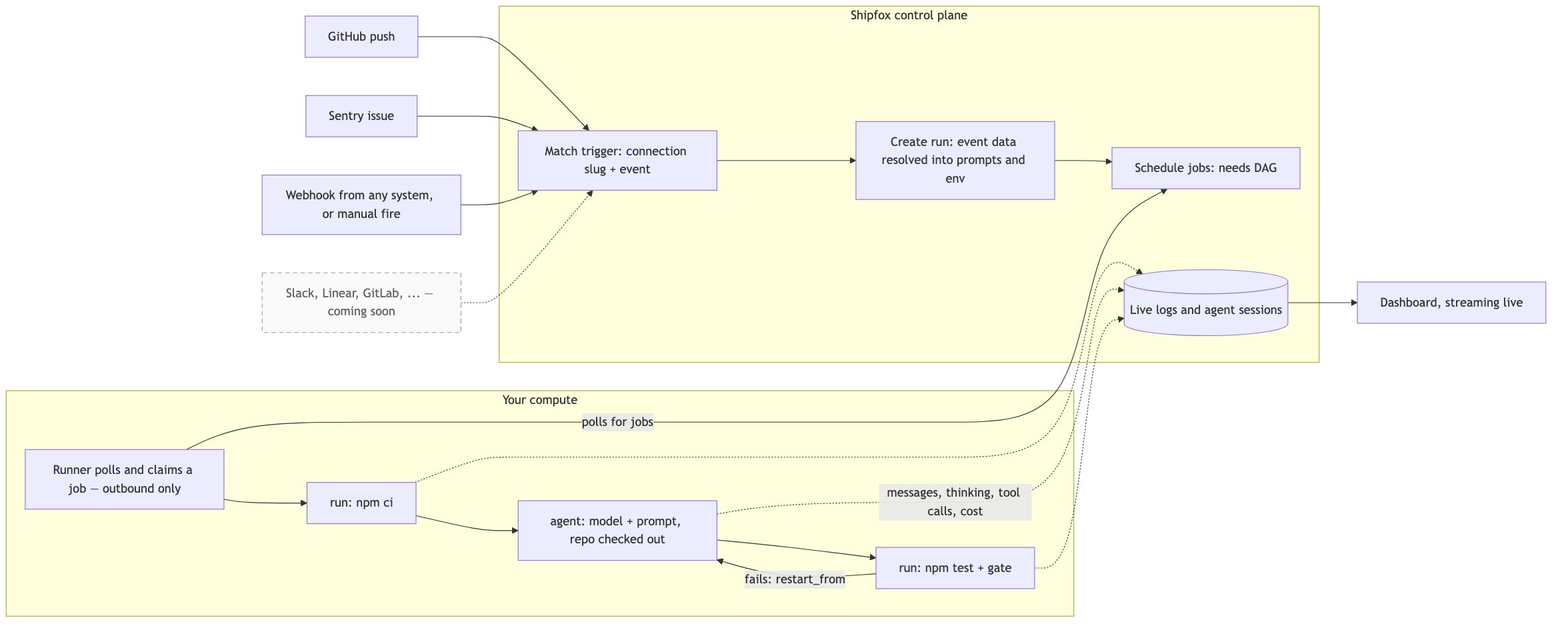
Core concepts
Workflows
The YAML files that define your automation — name, triggers, jobs, steps, and environment variables.
Jobs, Steps & Agents
How work is structured and executed inside a workflow, including shell steps, agent steps, and gate conditions.
Triggers
What starts a run — GitHub pushes, Sentry issues, webhooks from any system, manual fires — with more integrations on the way.
Runners
The processes you register on your own compute that execute jobs. Runners poll Shipfox and are matched to jobs by label.
Shipped vs. roadmap
Features listed as roadmap are not yet available and should not be relied upon in production workflows.The current state of Shipfox, feature by feature
The current state of Shipfox, feature by feature
| Feature | Status |
|---|---|
Manual triggers (source: manual, event: fire) | ✅ Shipped |
GitHub push triggers (event: push) | ✅ Shipped |
| Sentry issue triggers | ✅ Shipped |
Shell run steps (run) | ✅ Shipped |
Agent steps (model + prompt) | ✅ Shipped |
Gate / restart_from (gate.success_if, gate.on_failure.restart_from) | ✅ Shipped |
Multi-job DAGs (needs) | ✅ Shipped |
Trigger filter evaluation (filter) | 🔜 Roadmap |
Expression interpolation (${{ }}) | ✅ Shipped |
Listening jobs (listening: on/until — react to events inside a run) | 🚧 Coming soon |
Cron triggers (source: cron — run on a schedule) | 🚧 Coming soon |
loop, matrix, branch step kinds | 🔜 Roadmap |
| GitLab push triggers | 🔜 Roadmap |
What you can build
Checks on every push
Run tests, lint, and get an AI review on every commit — automatically, in one workflow that lives with your code.
Agent-powered fixes
Let an agent read your codebase and propose or apply a fix directly from a Sentry issue or a failing test.
Gate and retry loops
Retry a step until tests pass using
gate with success_if and on_failure.restart_from — no custom scripting needed.Agents that answer reviews
Coming soon: a job that listens for PR review comments and runs an agent per batch until the PR merges.