

Self-Hosting Architecture
Understand the services, network paths, and runner choices in a self-hosted Shipfox deployment.
In a self-hosted deployment, you operate the Shipfox control plane and connect it to PostgreSQL, Temporal, and S3-compatible object storage. You also operate the runners that execute repository commands and agents.
This page explains the deployment boundary and the services you must plan.
What you run, and what talks to what
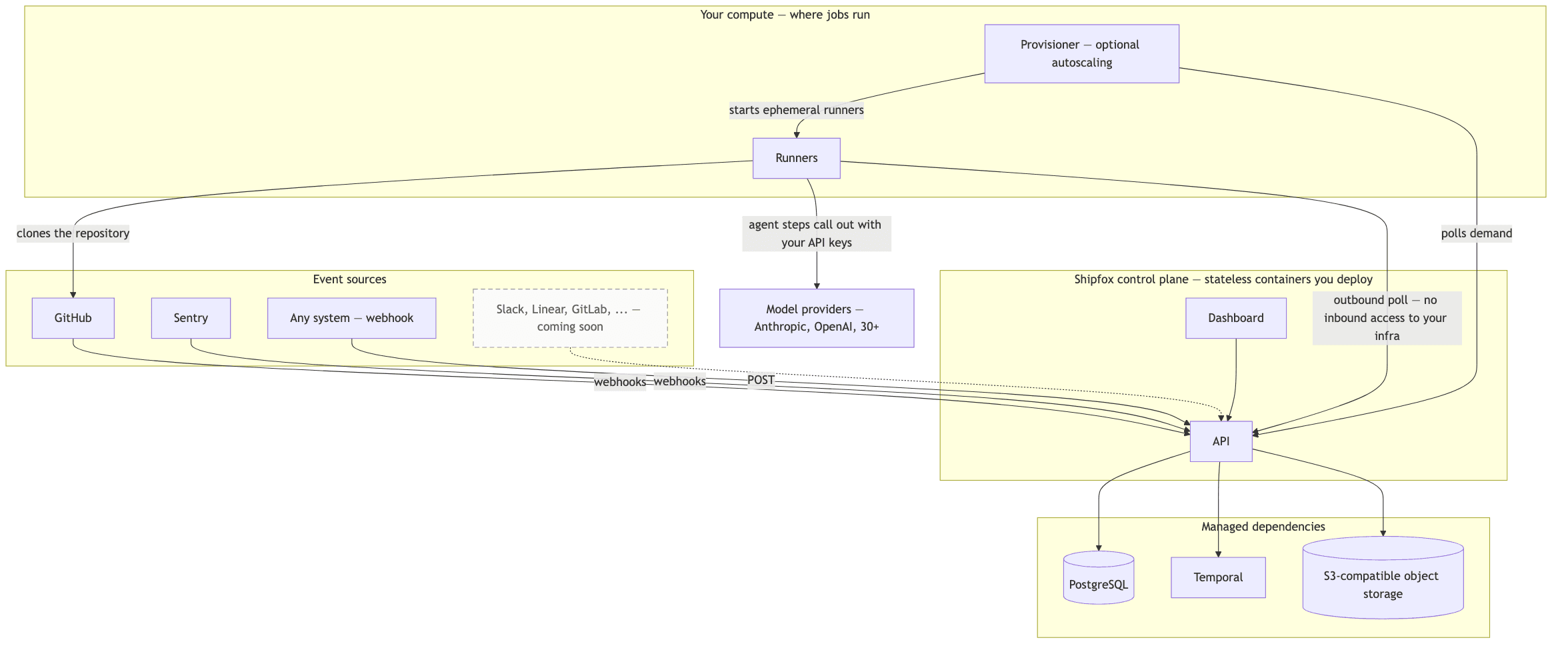
Deployment topology. Click to enlarge.
Two directions matter. Runners only connect outward, so you never open an inbound port into your compute. Agent traffic to model providers leaves from your runners, using your API keys rather than the control plane.
External services
The control plane needs these external services:
| Service | Recommended options |
|---|---|
| PostgreSQL | Any managed PostgreSQL 15+ instance (RDS, Cloud SQL, Supabase, self-managed) |
| Temporal | Self-hosted Temporal cluster or Temporal Cloud |
| Object storage | Any S3-compatible service (AWS S3, GCS with interop, MinIO, Cloudflare R2) |
The Shipfox API and dashboard are stateless processes. They can run as containers on Kubernetes, ECS, a virtual machine, or another container host. The runner is separate and does not need to share their compute.
Control-plane and runner access differ
A runner polls the control plane and executes jobs on a machine or in a container. The runner needs outbound access to Shipfox, the source repository, and any package registry or model provider used by its jobs.
The control plane does not need an inbound connection to the runner. This lets a runner stay inside a private network while it reaches internal code and services. It also means that runner labels are part of the access policy: jobs placed on a private runner gain the network reach of that environment.
Use a long-lived runner for steady work or environments that are slow to create. Use a runner provisioner for bursty work and a single-job container boundary. Both models use the same registration, label, checkout, and permission rules.
Choose the next setup task
Evaluate locally
Start the complete development stack with Docker Compose.
Start a runner
Register a runner process and verify that it claims a job.
Run a provisioner
Start the Docker provisioner and verify on-demand runner creation.
Runner configuration
Look up runner environment variables, labels, and token types.