> ## Documentation Index
> Fetch the complete documentation index at: https://www.shipfox.io/docs/llms.txt
> Use this file to discover all available pages before exploring further.
# Integrations: Connect the Tools That Trigger Workflows
> Connect GitHub, Sentry, and custom webhooks to Shipfox so their events can trigger workflows. Each connection has a slug you reference as a trigger source.
An **integration** connects an external system — GitHub, Sentry, or a custom
webhook endpoint — to your Shipfox workspace so its events can start workflow
runs. You connect an integration once in your workspace, and every project in that
workspace can trigger workflows from it.
## Connections and slugs
Connecting an integration creates a **connection**. Each connection has a **slug**
— a short, stable identifier that you put in a trigger's `source` field. The slug
is how a workflow says *which* connection an event must come from.
```yaml theme={null}
triggers:
on_push:
source: github_acme # <- the connection slug, not the bare word "github"
event: push
```
A trigger's `source` is the **connection slug**, not the provider name. Writing
`source: github` only works if a connection is literally named `github`. Use the
slug shown for your connection after you connect it (for GitHub this defaults to
`github_`, for example `github_acme`). If the `source` doesn't match a
connection slug, the trigger is stored but never fires.
Slugs also let one workspace hold **several connections of the same provider** —
for example a `github_acme` org connection and a `github_acme-labs` connection —
and target each independently from different workflows.
## Available integrations
| Integration | Status | Events |
| ---------------------------------------- | -------------- | ----------------------------------------------------------------------------------------- |
| [GitHub](/integrations/github) | ✅ Shipped | `push` and other repository events |
| [Sentry](/integrations/sentry) | ✅ Shipped | `issue.created`, `issue.resolved`, `issue.assigned`, `issue.archived`, `issue.unresolved` |
| [Custom webhook](/integrations/webhooks) | ✅ Shipped | `received` |
| [Linear](/integrations/linear) | 🚧 Coming soon | — |
| [Slack](/integrations/slack) | 🚧 Coming soon | — |
| GitLab | 🔜 Roadmap | — |
The built-in **`manual`** source needs no integration — it fires when you click
**Run** in the dashboard or call the API. See Triggers for
its schema.
## The trigger contract
Every integration trigger shares the same two required fields, plus two optional
ones:
The **connection slug** the event must come from (for example `github_acme`).
The event name from that source (for example `push` or `issue.created`). The
event names each integration emits are listed on its page.
A CEL expression intended to narrow which events fire the trigger. **Parsed but
not yet evaluated** — today every event matching `(source, event)` fires,
regardless of the filter. Authoring one now is safe and forward-compatible.
Optional source-specific configuration. May be omitted for most sources.
## Finding your connection slug
The slug is `_`, lowercase: connecting the GitHub account
`acme` creates `github_acme`. Your workspace's integration settings
(**Settings → Integrations**) show each connection's display name — for example
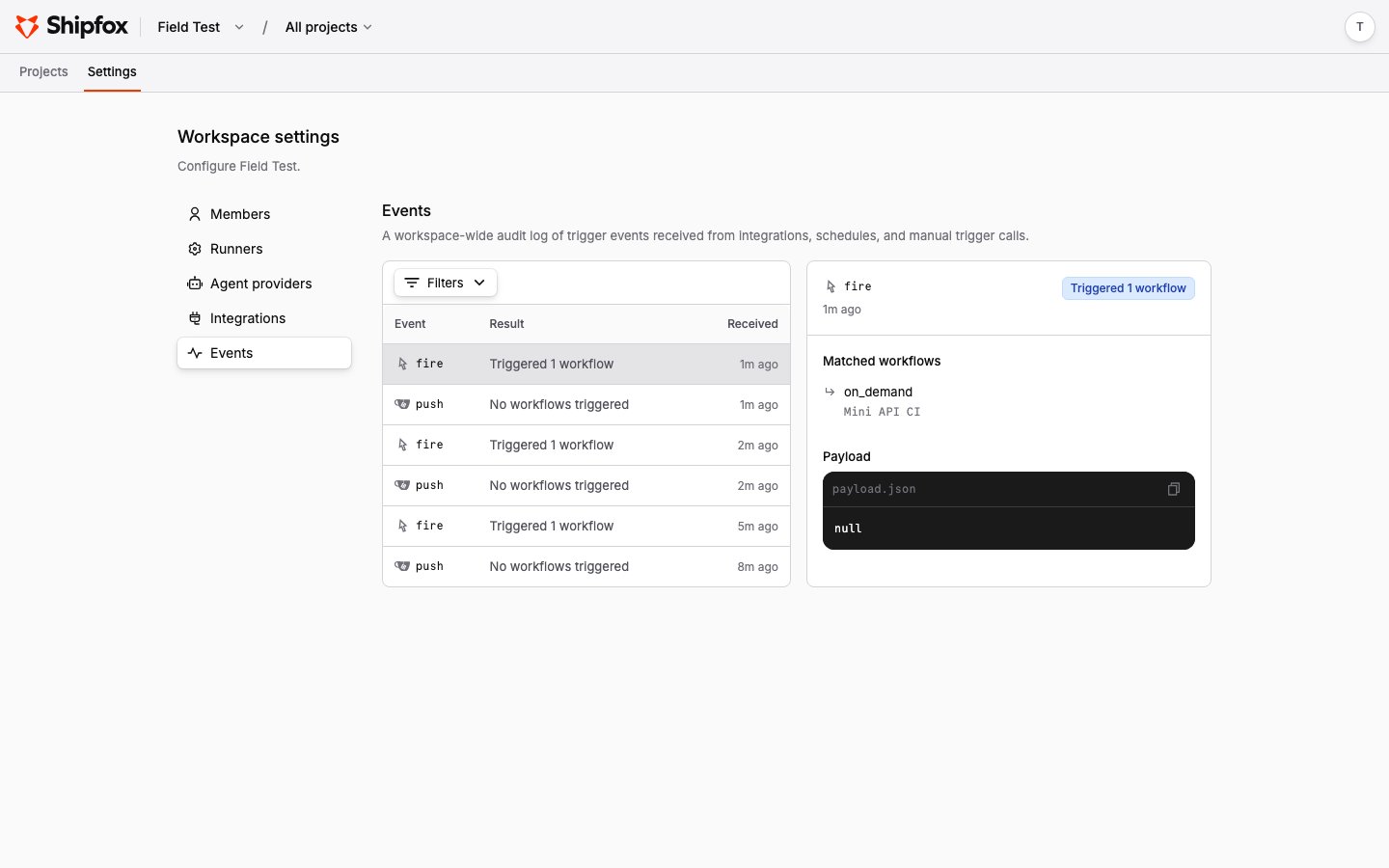
"GitHub acme" for the slug `github_acme`. The workspace's **Settings → Events**
page records every event a connection delivers; an event that shows **No
workflows triggered** usually means the `source` in your workflow does not match
the connection's slug.
 ## Webhook payloads
Shipfox does not maintain a reference for each provider's webhook payload shape —
those are owned by the provider and can change. Each integration page links to the
provider's own webhook documentation for the full payload. Shipfox forwards the
raw event to the run so your steps can read whatever the provider sent.
## Related pages
Connect a repository and trigger on pushes and other events.
Trigger workflows when Sentry issues change state.
Trigger from any system that can send an HTTP POST.
## Webhook payloads
Shipfox does not maintain a reference for each provider's webhook payload shape —
those are owned by the provider and can change. Each integration page links to the
provider's own webhook documentation for the full payload. Shipfox forwards the
raw event to the run so your steps can read whatever the provider sent.
## Related pages
Connect a repository and trigger on pushes and other events.
Trigger workflows when Sentry issues change state.
Trigger from any system that can send an HTTP POST.