> ## Documentation Index
> Fetch the complete documentation index at: https://www.shipfox.io/docs/llms.txt
> Use this file to discover all available pages before exploring further.
# Local Evaluation
> Run the full Shipfox stack on your machine with Docker Compose — API, dashboard, PostgreSQL, Temporal, Gitea, and object storage — to explore the platform.
Evaluation mode runs the full Shipfox stack — API, dashboard, PostgreSQL, Temporal,
Gitea, and object storage — locally with Docker Compose, so you can explore the
platform without any cloud account. For a production deployment, see
[Self-Hosting](/installation/self-hosting).
Make sure the following are installed and available on your `PATH` before continuing:
* [Docker](https://docs.docker.com/get-docker/) (with Compose v2)
* [mise](https://mise.jdx.dev/) — installs the pinned Node.js, pnpm, and turbo versions
* [Git](https://git-scm.com/)
Clone the Shipfox repository to your local machine:
```bash theme={null}
git clone https://github.com/ShipfoxHQ/shipfox.git
cd shipfox
```
Install runtime tooling with `mise` and then install Node dependencies with `pnpm`:
```bash theme={null}
mise install && pnpm install
```
`mise` installs the exact Node, pnpm, and turbo versions pinned in `mise.toml` (run `mise trust` if prompted). If you don't use `mise`, install Node, pnpm, and turbo yourself at the versions listed in that file.
Build the packages the API and dashboard depend on. Run these two commands in order:
```bash theme={null}
turbo build --filter=@shipfox/vite
turbo build --filter=@shipfox/api...
```
The first command builds shared UI primitives; the second builds everything the API transitively depends on. Both are incremental — re-running after a code change only rebuilds what changed.
Bring up the Docker Compose stack:
```bash theme={null}
docker compose up -d
```
This starts the following services in the background:
| Service | Purpose |
| ----------------------- | ------------------------------------------------------------ |
| PostgreSQL | Primary database for Shipfox state |
| Temporal | Workflow orchestration engine used internally by Shipfox |
| Gitea | Local Git hosting (simulates GitHub for local push triggers) |
| Object storage (garage) | S3-compatible storage for step-log artifacts |
A demo repository `shipfox/demo` is seeded automatically. You can connect this repository to a project for your first run without needing a real GitHub repo.
The stack binds fixed host ports: 5432 (PostgreSQL), 7233 (Temporal), 3000
(Gitea HTTP), 2222 (Gitea SSH), and 3900 (object storage S3). If
`docker compose up` fails with "port is already allocated", override the
conflicting port with the matching variable — `SHIPFOX_POSTGRES_PORT`,
`SHIPFOX_TEMPORAL_PORT`, `SHIPFOX_GITEA_HTTP_PORT`, `SHIPFOX_GITEA_SSH_PORT`,
or `SHIPFOX_GARAGE_S3_PORT` — before running the command again.
Open two terminal windows and start the API and dashboard processes:
```bash theme={null}
# Terminal 1 — API on port 16101
pnpm --filter=@shipfox/api dev
# Terminal 2 — Dashboard on port 5173
pnpm --filter=@shipfox/client dev
```
Wait until both processes are ready before proceeding. The API prints `Server listening at http://127.0.0.1:16101`; the dashboard prints `VITE ready`. The dashboard is available at `http://localhost:5173` and the API at `http://localhost:16101`.
Open `http://localhost:5173` and sign up with any name, email, and password.
Signup asks you to verify your email. In evaluation mode there is no mail
server — the API prints every email to its terminal. Find the line containing
`Verify your email` in the API logs and open the verification link it
contains.
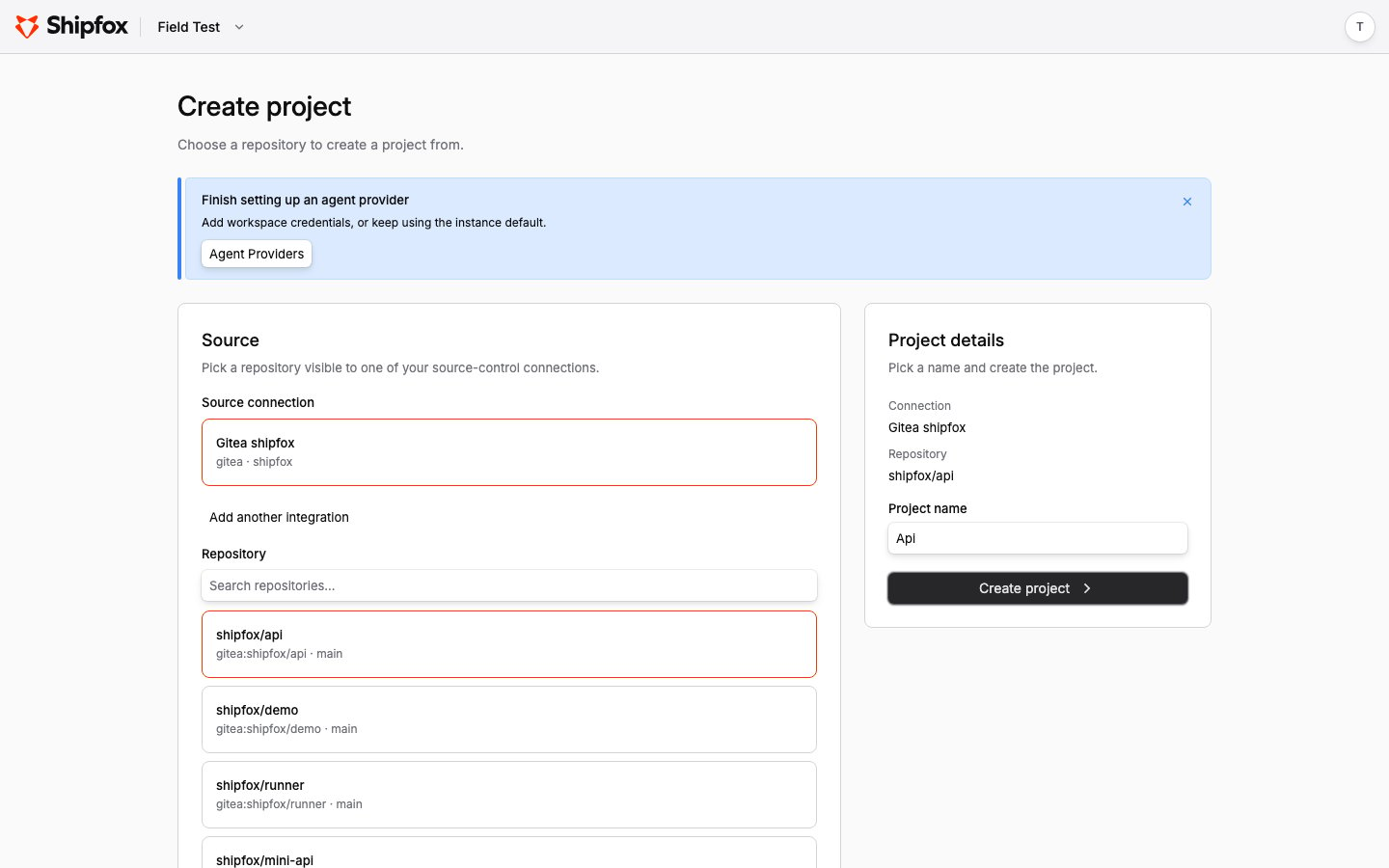
After verification, the dashboard walks you through setup:
1. **Create your workspace** — pick any name.
2. **Install source control** — choose **Gitea** and enter the organization `shipfox` (the org seeded by Docker Compose).
3. **Configure agent provider** — skip this unless you want to run agent steps immediately.
4. **Create project** — pick a seeded repository such as `shipfox/demo`. The project name is pre-filled from the repository.
 A runner is required to execute jobs. Follow these steps to register one:
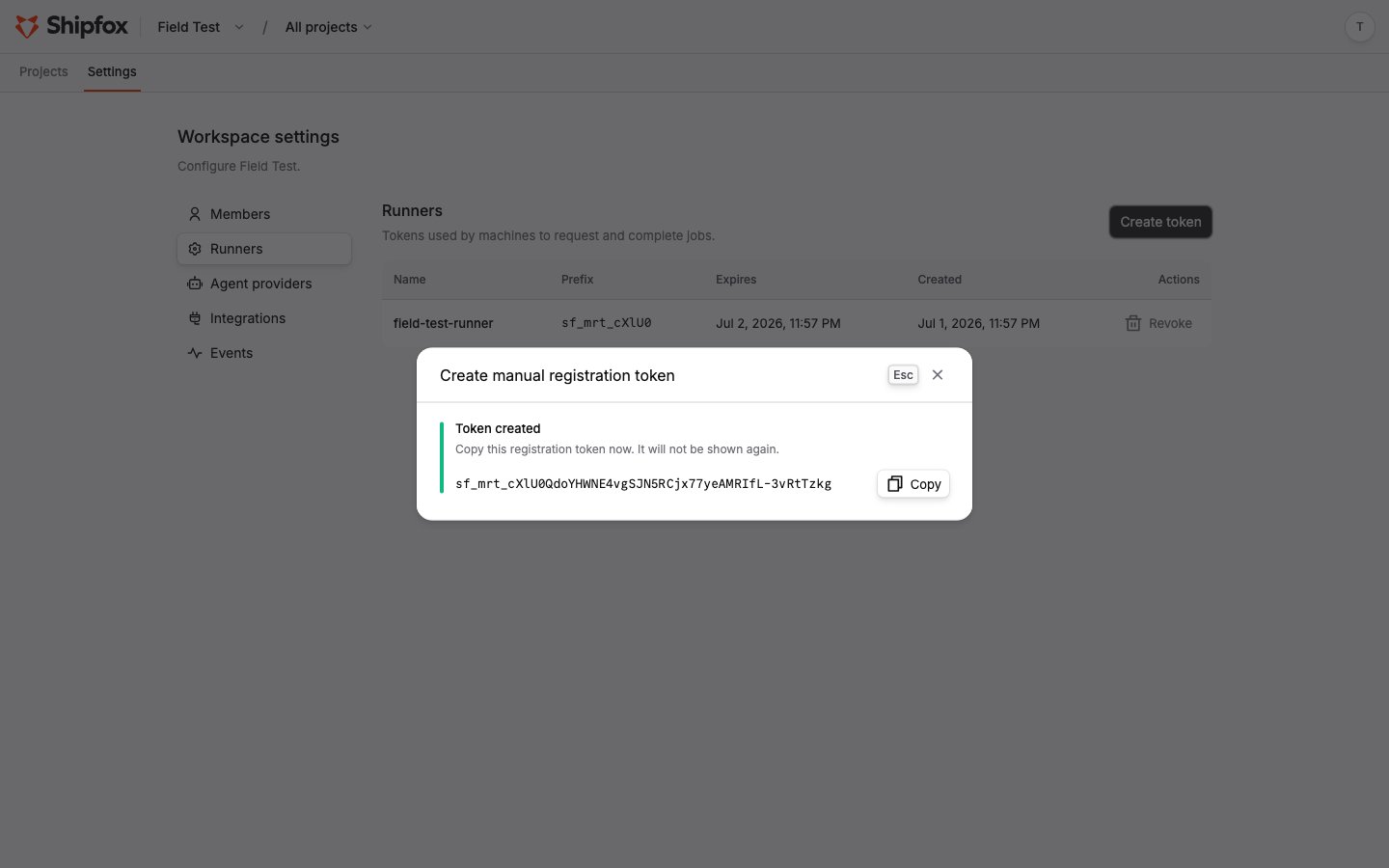
1. Go to **Settings → Runners** and click **Create token**. Name the token, pick an expiry, and copy the token — it is shown only once.
2. Start a runner in a third terminal, passing your token and labels as environment variables:
```bash theme={null}
SHIPFOX_API_URL=http://localhost:16101 \
SHIPFOX_RUNNER_REGISTRATION_TOKEN= \
SHIPFOX_RUNNER_LABELS=ubuntu-latest,node-22 \
pnpm --filter=@shipfox/runner dev
```
The runner reads `SHIPFOX_API_URL`, `SHIPFOX_RUNNER_REGISTRATION_TOKEN`, and `SHIPFOX_RUNNER_LABELS` from its environment. Within a few seconds its terminal prints `Runner session registered` — the runner is now polling for jobs. The dashboard does not list connected runners yet; the runner's own log is the place to confirm it is connected.
A runner is required to execute jobs. Follow these steps to register one:
1. Go to **Settings → Runners** and click **Create token**. Name the token, pick an expiry, and copy the token — it is shown only once.
2. Start a runner in a third terminal, passing your token and labels as environment variables:
```bash theme={null}
SHIPFOX_API_URL=http://localhost:16101 \
SHIPFOX_RUNNER_REGISTRATION_TOKEN= \
SHIPFOX_RUNNER_LABELS=ubuntu-latest,node-22 \
pnpm --filter=@shipfox/runner dev
```
The runner reads `SHIPFOX_API_URL`, `SHIPFOX_RUNNER_REGISTRATION_TOKEN`, and `SHIPFOX_RUNNER_LABELS` from its environment. Within a few seconds its terminal prints `Runner session registered` — the runner is now polling for jobs. The dashboard does not list connected runners yet; the runner's own log is the place to confirm it is connected.
 A runner exits after a default idle window (about 5 minutes). To keep it polling indefinitely during evaluation, add `SHIPFOX_POLL_MAX_DURATION_MS=0` to its environment.
Create a workflow file in the `shipfox/demo` repository that uses a manual trigger — for example:
```yaml theme={null}
name: First run
runner: ubuntu-latest
triggers:
on_demand:
source: manual
event: fire
jobs:
hello:
steps:
- run: echo "Shipfox is running!"
```
Clone the seeded repo from the local Gitea, add the file, and push. The seeded admin account is `gitea-admin` / `gitea-admin-dev-password`, and the Gitea web UI is at `http://localhost:3000`:
```bash theme={null}
git clone http://gitea-admin:gitea-admin-dev-password@localhost:3000/shipfox/demo.git
```
Shipfox picks the workflow up within seconds. Open the project's **Workflows** page and click **Run** next to the workflow. Watch the logs stream live in the run detail view.
In evaluation mode, **GitHub** push triggers will not fire because the local API is not reachable from GitHub's webhook infrastructure. **Gitea** push triggers do fire: the compose stack registers a webhook from the seeded `shipfox` org to your local API. Add a push trigger with the Gitea connection's slug as its source:
```yaml theme={null}
triggers:
on_push:
source: gitea_shipfox # _
event: push
```
Then `git push` to the connected repository and watch the run start.
Gitea is the evaluation stack's local stand-in for GitHub — it exists only in
this Docker Compose setup. Deployed installations (self-hosted or cloud) connect
**GitHub**; GitLab support is on the roadmap.
Agent steps (`model` + `prompt`) require the appropriate provider API key to be set in the runner's environment. For Anthropic models, set `ANTHROPIC_API_KEY` before starting the runner process. Other providers use their own key environment variables.
A runner exits after a default idle window (about 5 minutes). To keep it polling indefinitely during evaluation, add `SHIPFOX_POLL_MAX_DURATION_MS=0` to its environment.
Create a workflow file in the `shipfox/demo` repository that uses a manual trigger — for example:
```yaml theme={null}
name: First run
runner: ubuntu-latest
triggers:
on_demand:
source: manual
event: fire
jobs:
hello:
steps:
- run: echo "Shipfox is running!"
```
Clone the seeded repo from the local Gitea, add the file, and push. The seeded admin account is `gitea-admin` / `gitea-admin-dev-password`, and the Gitea web UI is at `http://localhost:3000`:
```bash theme={null}
git clone http://gitea-admin:gitea-admin-dev-password@localhost:3000/shipfox/demo.git
```
Shipfox picks the workflow up within seconds. Open the project's **Workflows** page and click **Run** next to the workflow. Watch the logs stream live in the run detail view.
In evaluation mode, **GitHub** push triggers will not fire because the local API is not reachable from GitHub's webhook infrastructure. **Gitea** push triggers do fire: the compose stack registers a webhook from the seeded `shipfox` org to your local API. Add a push trigger with the Gitea connection's slug as its source:
```yaml theme={null}
triggers:
on_push:
source: gitea_shipfox # _
event: push
```
Then `git push` to the connected repository and watch the run start.
Gitea is the evaluation stack's local stand-in for GitHub — it exists only in
this Docker Compose setup. Deployed installations (self-hosted or cloud) connect
**GitHub**; GitLab support is on the roadmap.
Agent steps (`model` + `prompt`) require the appropriate provider API key to be set in the runner's environment. For Anthropic models, set `ANTHROPIC_API_KEY` before starting the runner process. Other providers use their own key environment variables.