> ## Documentation Index
> Fetch the complete documentation index at: https://www.shipfox.io/docs/llms.txt
> Use this file to discover all available pages before exploring further.
# Logging: Live and Persisted Output for Every Step
> Shipfox streams run-step output and structured agent-session events live, then compacts them to object storage. Secrets are masked; logs are retained and bounded.
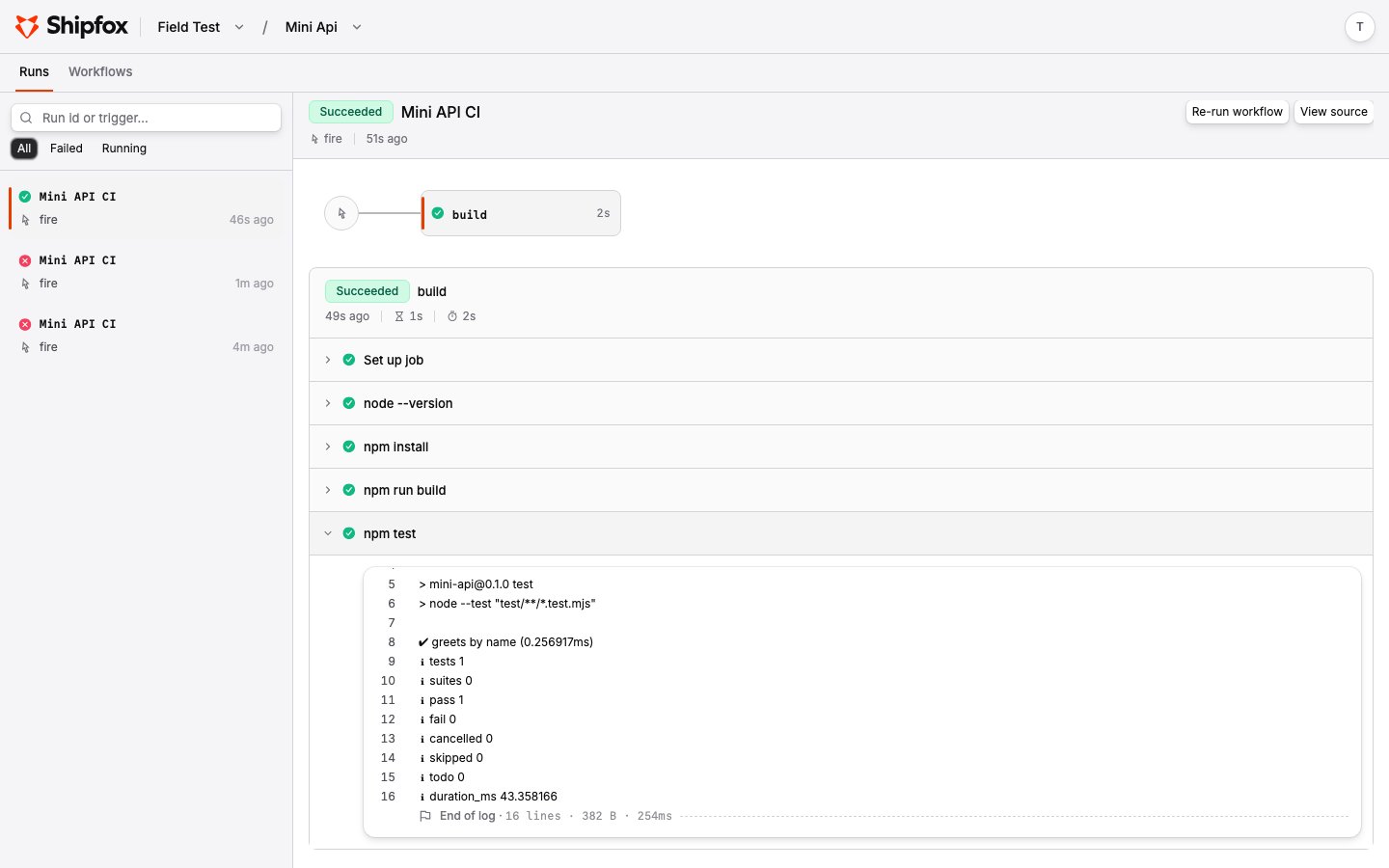
Every step in a workflow run produces logs. Shipfox streams them **live** while the
step runs and **persists** them afterwards, so you can watch a run in real time and
come back to it later. Agent steps get richer treatment than a plain command: their
model messages, thinking, and tool calls are captured as structured events.
## What gets logged
An agent step captures a structured **session** in addition to any stdout: each
model message, thinking block, tool call, and tool result becomes its own entry,
along with the provider, model, token usage, and cost. The dashboard expands
these into a readable transcript rather than a wall of text — you watch the
agent work, not just its stdout.
A `run` step's `stdout` and `stderr` are captured line by line. Output can be
organized into named, collapsible [groups](#grouping-output). Secrets known to
the runner are masked before the output leaves the machine.
 ## Grouping output
Inside a `run` step, wrap output in **named groups** with `::group::` and
`::endgroup::` markers, each on its own line. The dashboard renders every group as a
collapsible section titled with its name, so a long step reads as a tidy outline
instead of a wall of text.
```bash theme={null}
echo "::group::Install dependencies"
npm ci
echo "::endgroup::"
echo "::group::Run tests"
npm test
echo "::endgroup::"
```
Groups **nest** into a tree — open a group inside another and the dashboard shows the
enclosing structure:
```bash theme={null}
echo "::group::Build"
echo "::group::Compile"
tsc -b
echo "::endgroup::"
echo "::group::Bundle"
vite build
echo "::endgroup::"
echo "::endgroup::"
```
Nesting is capped at **32 levels deep**; past the cap a group is flattened into plain
output rather than adding another level. Group names are limited to 1 KiB.
## Live tail, then persisted
Logs move through two phases:
1. **Hot (live).** As a step runs, the runner streams output to the API in chunks.
The dashboard tails it with a cursor, so you see output within a couple of
seconds of it being produced.
2. **Cold (persisted).** Once a step's stream closes, Shipfox compacts the logs
into a single compressed file in object storage (the garage / S3 bucket from
installation). Later reads are served directly from storage.
This is transparent in the dashboard — you don't choose a phase; the run detail
view reads whichever is current.
## Agent config on the run detail
For agent steps, the run detail also shows the **resolved** provider, model, and
thinking level that actually ran — after workspace defaults were applied — plus
targeted guidance when a step failed because a provider wasn't configured, a model
was unavailable, or credentials were invalid. See
Model Providers for how that config is resolved.
## Limits and retention
Logs are bounded so a runaway step can't produce unbounded storage or cost:
* **Per-job budget.** Each job has a log budget (32 MiB, growing over time). Past
it, further output is dropped and the step is marked truncated rather than failing
the run.
* **Retention.** Persisted logs are kept for a default of 90 days, then deleted from
both the database and object storage.
* **Truncation is explicit.** If output was dropped — because the budget was hit or
a runner died mid-step — the stream is flagged truncated so you know the logs are
incomplete.
The budget, retention window, and storage bucket are configurable when you
self-host. See Self-Hosting for the object-storage setup.
## Related pages
Where run and agent steps are defined.
Providers, models, and how agent-step config is resolved.
## Grouping output
Inside a `run` step, wrap output in **named groups** with `::group::` and
`::endgroup::` markers, each on its own line. The dashboard renders every group as a
collapsible section titled with its name, so a long step reads as a tidy outline
instead of a wall of text.
```bash theme={null}
echo "::group::Install dependencies"
npm ci
echo "::endgroup::"
echo "::group::Run tests"
npm test
echo "::endgroup::"
```
Groups **nest** into a tree — open a group inside another and the dashboard shows the
enclosing structure:
```bash theme={null}
echo "::group::Build"
echo "::group::Compile"
tsc -b
echo "::endgroup::"
echo "::group::Bundle"
vite build
echo "::endgroup::"
echo "::endgroup::"
```
Nesting is capped at **32 levels deep**; past the cap a group is flattened into plain
output rather than adding another level. Group names are limited to 1 KiB.
## Live tail, then persisted
Logs move through two phases:
1. **Hot (live).** As a step runs, the runner streams output to the API in chunks.
The dashboard tails it with a cursor, so you see output within a couple of
seconds of it being produced.
2. **Cold (persisted).** Once a step's stream closes, Shipfox compacts the logs
into a single compressed file in object storage (the garage / S3 bucket from
installation). Later reads are served directly from storage.
This is transparent in the dashboard — you don't choose a phase; the run detail
view reads whichever is current.
## Agent config on the run detail
For agent steps, the run detail also shows the **resolved** provider, model, and
thinking level that actually ran — after workspace defaults were applied — plus
targeted guidance when a step failed because a provider wasn't configured, a model
was unavailable, or credentials were invalid. See
Model Providers for how that config is resolved.
## Limits and retention
Logs are bounded so a runaway step can't produce unbounded storage or cost:
* **Per-job budget.** Each job has a log budget (32 MiB, growing over time). Past
it, further output is dropped and the step is marked truncated rather than failing
the run.
* **Retention.** Persisted logs are kept for a default of 90 days, then deleted from
both the database and object storage.
* **Truncation is explicit.** If output was dropped — because the budget was hit or
a runner died mid-step — the stream is flagged truncated so you know the logs are
incomplete.
The budget, retention window, and storage bucket are configurable when you
self-host. See Self-Hosting for the object-storage setup.
## Related pages
Where run and agent steps are defined.
Providers, models, and how agent-step config is resolved.